Share
Using the native sharing capabilities of the device to provide users with the ability to share text and files.
Properties
| Property | Type | Description |
|---|---|---|
| title | string | Optional title (e.g. email’s title) |
| text | string | Text and/or URL to share |
| files | string | Binded files from sources like camera or picker. e.g ${filePicker.files}, ${camerId.files} |
Example
The share action is triggered when the “Open Share Sheet” button is tapped. It typically opens the native share sheet on the device, allowing users to share content. In this case, it shares a title (“EnsembleUI”) and a URL (“https://ensembleui.com/ ”).
  - Button:
      label: Open Share Sheet
      onTap:
        share:
          title: EnsembleUI
          text: https://ensembleui.com/
  - Text:
      text: Works only on Native iOS and Android
Share Sheet Screenshot
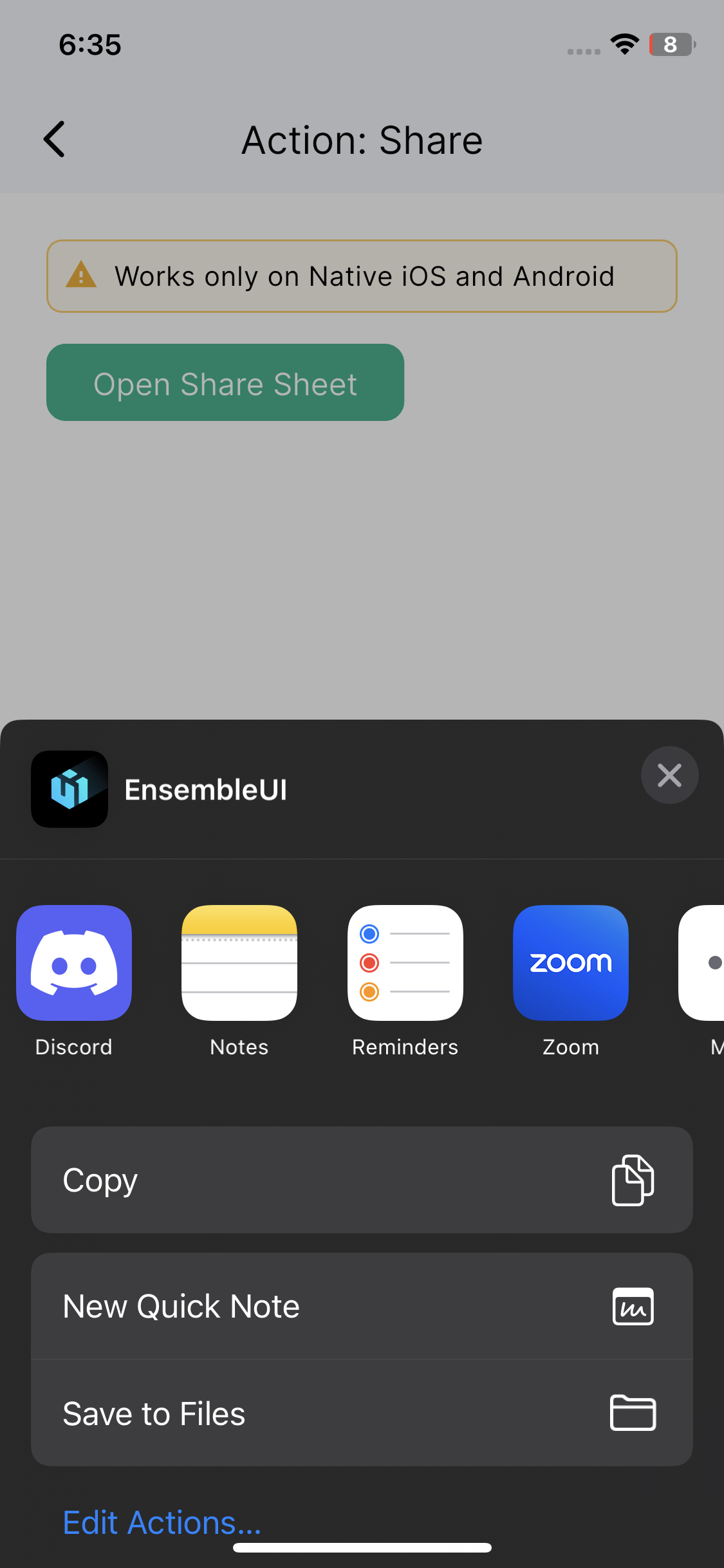
Clicking the "Open Share Sheet" will open share sheet to share the provided text and title
Here’s the example of how you can share files using share action
- Button:
        label: Share Files
        onTap:
          pickFiles:
            id: filePicker
            source: files
            onComplete:
              share:
                files: ${filePicker.files}
                text: I selected this file
complete example here
Last updated on